Monday, February 3, 2014

Story of the New Start Center in LibreOffice 4.2

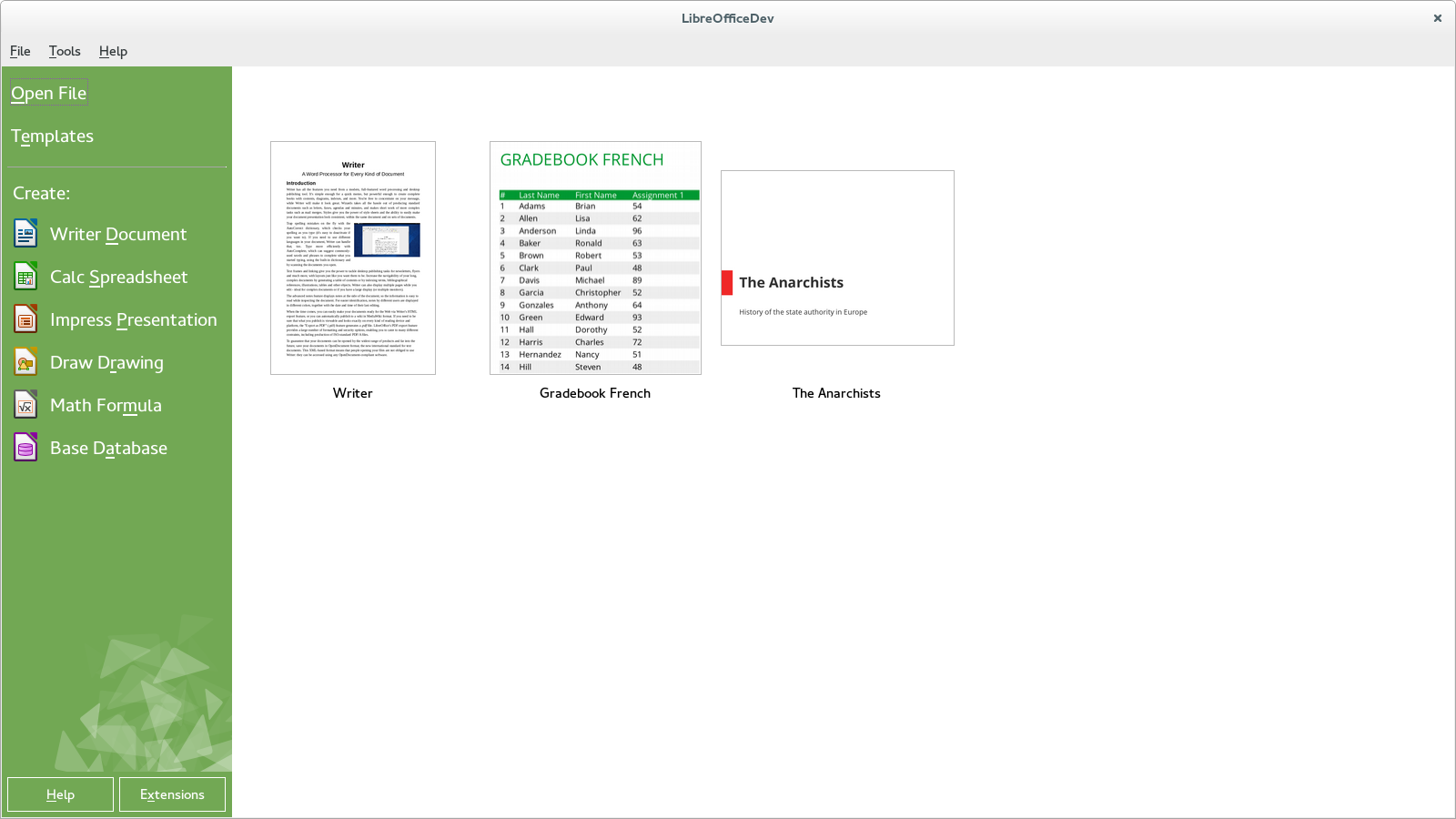
LibreOffice 4.2 has been released - have you tried it? If yes, you might have experienced the new start center that looks about like this:
Many people have contributed to it, and this is going to be a "Thank you" blog post. I hope I remember everyone who has helped; if not, please let me know in the comment - would be a shame to miss anyone.

Original idea

It all started as a Google Summer of Code idea that I have filed, and later mentored. Basically, I wanted a student to reuse the Caolan McNamara's awesome dynamic dialogs to provide modern and easy way to create a beautiful dialog, and GSoC 2012 project that introduced a new template manager in LibreOffice 4.0 - done by Rafael Dominguez and Cédric Bosdonnat.

The work itself

The main part of the work was done by Krisztian Pinter, who was working on it as a GSoC project too. His first task was to convert the old start center to the dynamic layout, so that the start center could much more easily adapt when the user resizes the screen.

But that was not all - his next task was to plug the template manager code in, and extend it so that it was able to show recent files instead of the templates. He  made the needed changes, adapted the look to the preliminary design made by the LibreOffice Design / UX team, and the GSoC period was over :-)

We have integrated it into the LibreOffice master, and I was patiently waiting when we get the final look blueprint from the design guys.

The final look

And it came! The code was in the master and in the daily builds, so everyone could play with it. For some time, nobody reacted on my call for the final look, but finally, Mateusz Zasuwik sent a design proposal of Krzysztof Ponikiewski to the LibreOffice Design mailing list which lead to discussion, and in the end to the start center we have now in 4.2.

The the ultimate version of the design was done mostly by Stefan Knorr, and Mirek Mazel, but others contributed to that too. I've adapted the code accordingly, Rodolfo Ribeiro Gomes helped me with some changes, and Tamas Zolnai fixed many bugs to give it the final, polished look & feel.

Thank you!

As you can see, the new start center couldn't have happened without shared work of many people - I want to thank you all. And of course, thank you Google for the Google for Summer of Code, I hope we will be able to participate as an organization this year again.

At the very moment, the LibreOffice UX Hackfest is taking place in Brussels, and I am working on few more improvements in the start center - like previews of even other filetypes than just ODF. But that will be for LibreOffice 4.3...

Friday, January 10, 2014

Help needed: Translating Getting Started Guide to Czech (or Slovak)

Standa Horáček just posted information about a shared effort to translate the LibreOffice Getting Started Guide to Czech and Slovak Language. You can find more information also in the original post by Miloš Šrámek.

Why shared?

The Czech and Slovak languages are close enough for Google translate to do a very good job of translating one to the other. So you as a translator can choose if you work on the Czech or the Slovak version, and the other team will use the automatic translation. After that, they will just fix the parts where the machine translation failed, which will save a lot of work.

If you are interested, please help spreading the word. Or even better - help translating! :-)

Thursday, January 2, 2014

LibreOffice 4.2: Better Windows bug reports

If you are not a programmer, and still want to help LibreOffice, there are many ways; one of them is submitting good bug reports. And a good bug report means a report with as much information as possible - one that contains the exact version, file(s) that caused the issue, description of the steps that lead to the problem.

In case LibreOffice crashes for you (sorry for that! - we are trying hard to avoid such situations, but it still may happen), and you are on Windows, description of the problem used to be all you were able to do - but now you can do more: you can attach a backtrace, and help the developers tremendously.

What is a backtrace? It is a log describing where exactly the program failed. It used to be very hard to get one on Windows, as you had to build your own LibreOffice.

Now it is much easier - you can provide such backtraces either using the official builds starting with LibreOffice 4.2.0rc1, or using the daily builds, without the need to build anything - you can just connect to a so called symbols server, and that's it.

Official releases

Just install LibreOffice 4.2.0rc1 (or later when available), and follow the information on the How to get a backtrace wiki page, it will lead you through the process. Thank you +Christian Lohmaier so much for setting that up!

Daily builds

I have updated my tinderbox to produce daily builds that are ready for debugging too. If you see a crash, it is worth checking if it happens in the most recent daily builds too - so installing this will allow you to check it, and directly provide a backtrace too.

Please try it out - I am looking forward to seeing backtraces in the your bugreports. In case you have trouble with the How to get a backtrace description, or the process itself, please let me know - or improve the page yourself; it is wiki, after all :-)

Oh, and all this wouldn't be possible without Luboš Luňák, +Fridrich Strba and others who have helped to connect various pieces together - thank you!

Thursday, December 19, 2013

Moved my blog

Recently I decided to update my blog to something that will be less awkward than NanoBlogger I have been using until now. I mean, writing the entries in vim is great, running the nb script is easy, but the turnover to preview it, fix, run the script again etc. is just annoying.

Now I moved my old blog to holesovsky.blogspot.com, which will be much easier for me to handle. With some Perl scripting, I even converted all the old entries here, so that the old blog can really RIP.

Small note to the conversion

When you are using the blogger.com's Import XML feature, and it looks like the import is taking too long (minutes or so), the answer is simple: Your XML was not accepted by blogger.com. I have seen reports of people waiting several hours to import the blog.

Don't wait in such cases - it was just that an error occurred, and the UI has not reported that. Just try to find out what is in the XML that could have caused the import to get stuck - usual suspects are &'s instead of " or OTOH things like &Acaron;, or other less common escapes.

Thursday, May 2, 2013

Recent documents in LibreOffice

This is again one of those little improvements that make LibreOffice much more usable, and that I so much love hacking on. I implemented a dropdown for the Open toolbar button that brings an easy access to the Recent Documents, and sent that the UX mailing list for feedback. I got some really useful hints. Even better - I gave Samuel code pointers to play with this a bit, and he came up with a beautiful patch that implements his ideas. And here is the result:

Samuel - thank you for this! :-) For anybody who would like to bring this functionality to the Start Center too (the screen you see when you start LibreOffice), here is an Easy Hack that will result in reusing the code for the Start Center too; and also will delete lots of duplicate code.

Thursday, January 10, 2013

LibreOffice 4.0: Use Firefox Personas in your favorite office suite

At the very last minute, my patches to support Firefox Personas in LibreOffice were accepted as a late feature for 4.0, hooray! :-) What does it mean?

Personas are easy-to-use themes that let you personalize the look of your Firefox says the Personas page. In fact, it is a great collection of many nice pictures you can apply in your Firefox with one click.

Olivier had the great idea to reuse them in LibreOffice too. I provided him with few code pointers to implement the feature, but then I decided this is actually so fun project that I wanted to do it myself (sorry, Olivier!) - and started that at the Munich HackFest. Long story short, here is the result:

Unfortunately we cannot choose Personas in LibreOffice with just one click as in Firefox, but it is as easy as it can be - just download LibreOffice 4.0 RC1 (or later) when available, choose Tools -> Options... -> Personalization -> Select Persona, and the rest is trivial, the dialog will lead you through the necessary steps. Enjoy!

Saturday, November 24, 2012

LibreOffice HackFest in Munich: Apply Style Combobox

The first day of the LibreOffice HackFest in Munich is nearly over, and I am happy to say that I've already achieved what I wanted to hack on:

This is how the "Apply Style" combo box looks like from now on - in LibreOffice 4.0, we will show previews of the styles directly in there, helping the users to choose the right style conveniently.

I can imagine some follow-up work, like being able to edit the style directly from the menu entry, instead of having to choose "More...", and editing from there; if you are interested to hack on this, I'll be glad to show you where :-) - just mail me.